 Claude Desktop | [Instructions](#claude-desktop) | [Install](#ai-skills-installation) |
| Claude Code | [Instructions](#claude-code) | [Install](#ai-skills-installation) |
| OpenAI Codex | [Instructions](#openai-codex) | [Install](#ai-skills-installation) |
| Gemini CLI | [Instructions](#gemini-cli) | [Install](#ai-skills-installation) |
|
Claude Desktop | [Instructions](#claude-desktop) | [Install](#ai-skills-installation) |
| Claude Code | [Instructions](#claude-code) | [Install](#ai-skills-installation) |
| OpenAI Codex | [Instructions](#openai-codex) | [Install](#ai-skills-installation) |
| Gemini CLI | [Instructions](#gemini-cli) | [Install](#ai-skills-installation) |
|  Cursor | [Instructions](#cursor) | [Install](#ai-skills-installation) |
|
Cursor | [Instructions](#cursor) | [Install](#ai-skills-installation) |
|  Windsurf | [Instructions](#windsurf) | [Install](#ai-skills-installation) |
|
Windsurf | [Instructions](#windsurf) | [Install](#ai-skills-installation) |
|  VS Code (Copilot) | [Instructions](#vs-code-copilot) | [Install](#ai-skills-installation) |
| JetBrains IDEs | [Instructions](#jetbrains-ides) | [Install](#ai-skills-installation) |
| ChatGPT | [Instructions](#chatgpt) | -- |
| Grok | [Instructions](#grok) | -- |
ChatGPT and Grok connect as **custom connectors** in the chat product (not IDE plugins). AI Skills are aimed at coding agents and don't apply there.
The following clients are also MCP-compatible and can connect using the [generic setup](#other-mcp-clients) below:
- **Continue** -- open-source AI assistant for VS Code and JetBrains
- **Zed** -- AI-native code editor
- **Amazon Q Developer** -- AWS AI coding assistant
MCP is an open standard with rapidly growing adoption. Any MCP-compatible client can connect to the 1inch MCP Server.
## MCP Server setup
### Claude Code
Claude Code supports HTTP MCP servers natively:
```bash
claude mcp add \
--transport http \
--scope user \
1inch-business \
https://api.1inch.com/mcp/protocol
```
### OpenAI Codex
Codex supports MCP servers in both the CLI and the VS Code extension:
```bash
codex --mcp-server "https://api.1inch.com/mcp/protocol"
```
For the VS Code extension, add the server in the Codex MCP settings panel with the same URL.
### Gemini CLI
Gemini CLI supports HTTP MCP servers natively:
```bash
gemini mcp add \
--transport http \
1inch-business \
https://api.1inch.com/mcp/protocol
```
### Claude Desktop
Claude Desktop communicates via stdio, so you use [`supergateway`](https://www.npmjs.com/package/supergateway) to bridge to the HTTP server. This requires Node.js 18+.
Add the following to your configuration file:
- **macOS:** `~/Library/Application Support/Claude/claude_desktop_config.json`
- **Windows:** `%APPDATA%\Claude\claude_desktop_config.json`
```json
{
"mcpServers": {
"1inch-business": {
"command": "/absolute/path/to/node/bin/npx",
"args": [
"-y",
"supergateway",
"--streamableHttp",
"https://api.1inch.com/mcp/protocol",
"--outputTransport",
"stdio"
],
"env": {
"PATH": "/absolute/path/to/node/bin:/usr/bin:/bin"
}
}
}
}
```
Replace `/absolute/path/to/node/bin` with the path to your Node.js installation (e.g., `/usr/local/bin` or the output of `dirname $(which node)`).
:::info
The `command` and `PATH` fields require absolute paths because AI clients do not inherit your shell's PATH. Using `npx -y` ensures the latest version of `supergateway` is downloaded automatically.
:::
### Cursor
Create or edit `.cursor/mcp.json` in your project root:
```json
{
"mcpServers": {
"1inch-business": {
"url": "https://api.1inch.com/mcp/protocol"
}
}
}
```
### Windsurf
Create or edit `~/.codeium/windsurf/mcp_config.json`:
```json
{
"mcpServers": {
"1inch-business": {
"serverUrl": "https://api.1inch.com/mcp/protocol"
}
}
}
```
### VS Code (Copilot)
The server is published to the [official MCP Registry](https://modelcontextprotocol.io/registry/about) as **`com.1inch.business/mcp`**, so registry-aware VS Code builds can install **1inch MCP** from the MCP server picker without manually entering the URL. Aggregators refresh on their own schedule, so if it is not listed yet, add the server manually as below.
Create or edit `.vscode/mcp.json` in your project root:
```json
{
"servers": {
"1inch-business": {
"type": "http",
"url": "https://api.1inch.com/mcp/protocol"
}
}
}
```
:::info
VS Code also supports configuring MCP servers through `settings.json` under the `"mcp"` key. See the [VS Code MCP documentation](https://code.visualstudio.com/docs/copilot/chat/mcp-servers) for additional options.
:::
### JetBrains IDEs
IntelliJ IDEA, WebStorm, PyCharm, and other JetBrains IDEs support MCP through the AI Assistant (2025.1+).
1. Open **Settings** -> **Tools** -> **AI Assistant** -> **Model Context Protocol (MCP)**
2. Click **Add**, select **HTTP**, and paste the following JSON snippet:
```json
{
"mcpServers": {
"1inch-business": {
"url": "https://api.1inch.com/mcp/protocol"
}
}
}
```
The 1inch MCP tools will be available in the AI Assistant chat within your IDE.
### ChatGPT
ChatGPT on **Business, Enterprise, and Edu** plans supports **custom connectors** (also surfaced as "apps") through Developer mode. A workspace admin -- or a member with connector permissions -- can add the 1inch MCP server so the tools become available in chat.
1. Open **Settings -> Connectors** (in the ChatGPT web app). If custom connectors aren't visible, enable **Advanced -> Developer mode**, or ask your workspace admin to enable it.
2. Choose **Create** (or **Add custom connector**).
3. Enter the connector details:
- **Name:** `1inch Business`
- **MCP Server URL:** `https://api.1inch.com/mcp/protocol`
- **Authentication:** complete the OAuth consent flow against the 1inch Business Portal, or provide an API key (see [Authentication setup](#authentication-setup)).
4. Save the connector and enable it for your chats. The 1inch tools appear in the connector/tools menu.
:::info
The public `search` and `walletconnect` tools work without authentication. Execution tools (`swap`, `orderbook`, `product_api`, `debug`) require OAuth or an API key.
:::
### Grok
Grok (xAI) supports connecting **any public MCP server** through **Custom connectors** ("Bring Your Own MCP") on paid tiers.
1. Go to [grok.com/connectors](https://grok.com/connectors).
2. Choose **New connector -> Custom**.
3. Paste the server URL: `https://api.1inch.com/mcp/protocol`.
4. Complete the OAuth flow against the 1inch Business Portal.
Grok then discovers the 1inch tools and can call them. As with other clients, `search` is available without authentication, while the execution tools require your 1inch API key or OAuth session (see [Authentication setup](#authentication-setup)).
### Other MCP clients
Most MCP clients support HTTP transport and can connect directly to the server URL:
- **Server URL:** `https://api.1inch.com/mcp/protocol`
For clients that only support stdio transport, use [`supergateway`](https://www.npmjs.com/package/supergateway) to bridge to the HTTP server (requires Node.js 18+):
```bash
npx -y supergateway \
--streamableHttp https://api.1inch.com/mcp/protocol \
--outputTransport stdio
```
Configure your client to launch this as a subprocess and communicate over stdin/stdout.
## AI Skills installation
Install the 1inch AI Skills so your agent knows the server URL, tools, auth patterns, and exact `product_api` call recipes (spot prices, gas, portfolio, and more):
```bash
npx skills add 1inch/1inch-ai
```
No npm package required -- distribution is git-based. For more details, see [AI Skills](/portal/documentation/ai-integration/ai-skills).
For **stdio-only** clients (e.g. Claude Desktop), the skill documents the same URLs and auth patterns, but you still need the [supergateway setup](#claude-desktop) above for the actual MCP connection.
## Authentication setup
The public tools (`search`, `list_examples`, `get_example`, `walletconnect`, `aqua`) work without authentication. Maker writes pair WalletConnect and sign the 1inch Terms of Use. To use the other execution tools (`swap`, `orderbook`, `product_api`, `debug`), pass your API key via the `Authorization` header. Get a key from the [1inch Business Portal](https://business.1inch.com/portal).
For the conceptual overview of API key vs OAuth authentication, see [Authentication](/portal/documentation/ai-integration/mcp-server#authentication).
**Claude Code:**
```bash
claude mcp add \
--transport http \
--header "Authorization: Bearer YOUR_API_KEY" \
--scope user \
1inch-business \
https://api.1inch.com/mcp/protocol
```
**Cursor** (`.cursor/mcp.json`):
```json
{
"mcpServers": {
"1inch-business": {
"url": "https://api.1inch.com/mcp/protocol",
"headers": {
"Authorization": "Bearer YOUR_API_KEY"
}
}
}
}
```
**VS Code Copilot** (`.vscode/mcp.json`):
```json
{
"servers": {
"1inch-business": {
"type": "http",
"url": "https://api.1inch.com/mcp/protocol",
"headers": {
"Authorization": "Bearer YOUR_API_KEY"
}
}
}
}
```
**Claude Desktop** (supergateway):
```json
{
"mcpServers": {
"1inch-business": {
"command": "/absolute/path/to/node/bin/npx",
"args": [
"-y",
"supergateway",
"--streamableHttp",
"https://api.1inch.com/mcp/protocol",
"--header",
"Authorization: Bearer YOUR_API_KEY",
"--outputTransport",
"stdio"
],
"env": {
"PATH": "/absolute/path/to/node/bin:/usr/bin:/bin"
}
}
}
}
```
For other clients, consult the client's MCP documentation for how to set custom HTTP headers on the transport.
## Wallet pairing (WalletConnect)
The [`walletconnect`](/portal/documentation/ai-integration/tools-reference#walletconnect) tool returns the pairing QR as an MCP **resource link** (`pairingQrResourceUri`) plus a fallback `wc:` URI. How that's surfaced depends on your client:
| Client | Pairing UX |
| :------------------------------------ | :------------------------------------------------------------------------------------------------------------------------------------------------------------------------------------------------------------------------------------- |
| Cursor / VS Code (Copilot) / Windsurf | The assistant fetches the QR via `resources/read` in the same MCP session and renders it inline in chat (or opens it from disk). If your tool host doesn't render images, ask the assistant to print the `wc:` URI in a code block. |
| Claude Desktop / Claude Code | Same as above -- the assistant reads the resource and renders the PNG. On macOS / Linux it can also open the file with `open` / `xdg-open`. |
| OpenAI Codex / Gemini CLI | If the CLI doesn't render images, the assistant prints the `wc:` URI; copy/paste it into your wallet app or another QR generator. The pairing URI is short-lived (~10 min). |
| Mobile-first usage (any client) | The response also includes `mobileDeeplinks` for [supported wallets](/portal/documentation/ai-integration/tools-reference#supported-wallets) -- tap the wallet's HTTPS link and it opens the wallet app directly without scanning a QR. |
**Tips:**
- **Don't call `connect` again to refresh** -- while pairing is still in progress, calling `connect` with the same `pairingTarget` returns the same URI. Repeated `connect` calls used to invalidate the active QR; now they don't, but only as long as the `pairingTarget` matches.
- **`status: "pending"` is success** -- keep polling. The wallet pairing only fails when `status` returns `kind: "error"`.
- **Solana sessions:** call `connect` with `"pairingTarget": "solana"` (Solana only) or `"both"` (EVM + Solana). Many mobile wallets reject pairings that propose `eip155` and `solana` together -- start with one namespace if you only need one.
- **Sticky `Mcp-Session-Id` is optional.** WalletConnect state survives restarts and replicas because it's persisted server-side, keyed by your authenticated org/app rather than the MCP session id.
## Troubleshooting
| Issue | Solution |
| :-------------------------------- | :---------------------------------------------------------------------------------------------------------------------------------------------------------------------------------------------------------------------------------------------------------------------------------- |
| Connection refused | Verify the `command` path is absolute. Check that `https://api.1inch.com/mcp/protocol` is reachable from your network |
| Server not appearing | Restart your AI client after modifying the configuration file. Check that the JSON is valid (no trailing commas) |
| `npx` not found | Ensure Node.js 18+ is installed. Use an absolute path to `npx` in the `command` field (e.g., `/usr/local/bin/npx`) |
| Too many sessions (429) | Each AI client window opens a separate session. Close windows you're not using, or wait 15 minutes for idle sessions to expire. This limit is specific to MCP sessions and does not affect your API usage |
| Tools not loading | Check the AI client's MCP logs for connection errors. In Cursor, use **Developer: Open MCP Log** from the command palette |
| Auth prompt not appearing | If using OAuth, ensure your MCP client supports OAuth flows. Alternatively, use an API key via the `Authorization` header (see [Authentication setup](#authentication-setup)). Some clients may require a restart after configuration changes |
| Stale results | Documentation indexes are updated periodically. If recently published content is missing, try again in a few minutes |
| WalletConnect QR expired | The pairing URI expires after ~10 minutes. Ask the assistant to call `walletconnect` `connect` again to get a fresh QR. If your earlier `connect` succeeded but you waited too long to scan, the wallet will show "expired" -- start over with a new `connect`. |
| Wallet won't approve EVM + Solana | Many mobile wallets reject pairings that propose `eip155` and `solana` together. Reconnect with `pairingTarget: "eth"` or `"solana"` only, or use a wallet listed as supporting both ([supported wallets](/portal/documentation/ai-integration/tools-reference#supported-wallets)). |
| `solana_namespace_not_available` | The active WalletConnect session was approved for EVM only. Ask the assistant to `disconnect`, then `connect` again with `"pairingTarget": "solana"` or `"both"` and approve the Solana namespace in the wallet. |
| QR doesn't render in chat | If the MCP host can't render the QR resource inline, ask the assistant to print the `wc:` URI in a fenced code block, or to open the PNG locally (`open` / `xdg-open` / `start`). On mobile, use the `mobileDeeplinks` from the response. |
VS Code (Copilot) | [Instructions](#vs-code-copilot) | [Install](#ai-skills-installation) |
| JetBrains IDEs | [Instructions](#jetbrains-ides) | [Install](#ai-skills-installation) |
| ChatGPT | [Instructions](#chatgpt) | -- |
| Grok | [Instructions](#grok) | -- |
ChatGPT and Grok connect as **custom connectors** in the chat product (not IDE plugins). AI Skills are aimed at coding agents and don't apply there.
The following clients are also MCP-compatible and can connect using the [generic setup](#other-mcp-clients) below:
- **Continue** -- open-source AI assistant for VS Code and JetBrains
- **Zed** -- AI-native code editor
- **Amazon Q Developer** -- AWS AI coding assistant
MCP is an open standard with rapidly growing adoption. Any MCP-compatible client can connect to the 1inch MCP Server.
## MCP Server setup
### Claude Code
Claude Code supports HTTP MCP servers natively:
```bash
claude mcp add \
--transport http \
--scope user \
1inch-business \
https://api.1inch.com/mcp/protocol
```
### OpenAI Codex
Codex supports MCP servers in both the CLI and the VS Code extension:
```bash
codex --mcp-server "https://api.1inch.com/mcp/protocol"
```
For the VS Code extension, add the server in the Codex MCP settings panel with the same URL.
### Gemini CLI
Gemini CLI supports HTTP MCP servers natively:
```bash
gemini mcp add \
--transport http \
1inch-business \
https://api.1inch.com/mcp/protocol
```
### Claude Desktop
Claude Desktop communicates via stdio, so you use [`supergateway`](https://www.npmjs.com/package/supergateway) to bridge to the HTTP server. This requires Node.js 18+.
Add the following to your configuration file:
- **macOS:** `~/Library/Application Support/Claude/claude_desktop_config.json`
- **Windows:** `%APPDATA%\Claude\claude_desktop_config.json`
```json
{
"mcpServers": {
"1inch-business": {
"command": "/absolute/path/to/node/bin/npx",
"args": [
"-y",
"supergateway",
"--streamableHttp",
"https://api.1inch.com/mcp/protocol",
"--outputTransport",
"stdio"
],
"env": {
"PATH": "/absolute/path/to/node/bin:/usr/bin:/bin"
}
}
}
}
```
Replace `/absolute/path/to/node/bin` with the path to your Node.js installation (e.g., `/usr/local/bin` or the output of `dirname $(which node)`).
:::info
The `command` and `PATH` fields require absolute paths because AI clients do not inherit your shell's PATH. Using `npx -y` ensures the latest version of `supergateway` is downloaded automatically.
:::
### Cursor
Create or edit `.cursor/mcp.json` in your project root:
```json
{
"mcpServers": {
"1inch-business": {
"url": "https://api.1inch.com/mcp/protocol"
}
}
}
```
### Windsurf
Create or edit `~/.codeium/windsurf/mcp_config.json`:
```json
{
"mcpServers": {
"1inch-business": {
"serverUrl": "https://api.1inch.com/mcp/protocol"
}
}
}
```
### VS Code (Copilot)
The server is published to the [official MCP Registry](https://modelcontextprotocol.io/registry/about) as **`com.1inch.business/mcp`**, so registry-aware VS Code builds can install **1inch MCP** from the MCP server picker without manually entering the URL. Aggregators refresh on their own schedule, so if it is not listed yet, add the server manually as below.
Create or edit `.vscode/mcp.json` in your project root:
```json
{
"servers": {
"1inch-business": {
"type": "http",
"url": "https://api.1inch.com/mcp/protocol"
}
}
}
```
:::info
VS Code also supports configuring MCP servers through `settings.json` under the `"mcp"` key. See the [VS Code MCP documentation](https://code.visualstudio.com/docs/copilot/chat/mcp-servers) for additional options.
:::
### JetBrains IDEs
IntelliJ IDEA, WebStorm, PyCharm, and other JetBrains IDEs support MCP through the AI Assistant (2025.1+).
1. Open **Settings** -> **Tools** -> **AI Assistant** -> **Model Context Protocol (MCP)**
2. Click **Add**, select **HTTP**, and paste the following JSON snippet:
```json
{
"mcpServers": {
"1inch-business": {
"url": "https://api.1inch.com/mcp/protocol"
}
}
}
```
The 1inch MCP tools will be available in the AI Assistant chat within your IDE.
### ChatGPT
ChatGPT on **Business, Enterprise, and Edu** plans supports **custom connectors** (also surfaced as "apps") through Developer mode. A workspace admin -- or a member with connector permissions -- can add the 1inch MCP server so the tools become available in chat.
1. Open **Settings -> Connectors** (in the ChatGPT web app). If custom connectors aren't visible, enable **Advanced -> Developer mode**, or ask your workspace admin to enable it.
2. Choose **Create** (or **Add custom connector**).
3. Enter the connector details:
- **Name:** `1inch Business`
- **MCP Server URL:** `https://api.1inch.com/mcp/protocol`
- **Authentication:** complete the OAuth consent flow against the 1inch Business Portal, or provide an API key (see [Authentication setup](#authentication-setup)).
4. Save the connector and enable it for your chats. The 1inch tools appear in the connector/tools menu.
:::info
The public `search` and `walletconnect` tools work without authentication. Execution tools (`swap`, `orderbook`, `product_api`, `debug`) require OAuth or an API key.
:::
### Grok
Grok (xAI) supports connecting **any public MCP server** through **Custom connectors** ("Bring Your Own MCP") on paid tiers.
1. Go to [grok.com/connectors](https://grok.com/connectors).
2. Choose **New connector -> Custom**.
3. Paste the server URL: `https://api.1inch.com/mcp/protocol`.
4. Complete the OAuth flow against the 1inch Business Portal.
Grok then discovers the 1inch tools and can call them. As with other clients, `search` is available without authentication, while the execution tools require your 1inch API key or OAuth session (see [Authentication setup](#authentication-setup)).
### Other MCP clients
Most MCP clients support HTTP transport and can connect directly to the server URL:
- **Server URL:** `https://api.1inch.com/mcp/protocol`
For clients that only support stdio transport, use [`supergateway`](https://www.npmjs.com/package/supergateway) to bridge to the HTTP server (requires Node.js 18+):
```bash
npx -y supergateway \
--streamableHttp https://api.1inch.com/mcp/protocol \
--outputTransport stdio
```
Configure your client to launch this as a subprocess and communicate over stdin/stdout.
## AI Skills installation
Install the 1inch AI Skills so your agent knows the server URL, tools, auth patterns, and exact `product_api` call recipes (spot prices, gas, portfolio, and more):
```bash
npx skills add 1inch/1inch-ai
```
No npm package required -- distribution is git-based. For more details, see [AI Skills](/portal/documentation/ai-integration/ai-skills).
For **stdio-only** clients (e.g. Claude Desktop), the skill documents the same URLs and auth patterns, but you still need the [supergateway setup](#claude-desktop) above for the actual MCP connection.
## Authentication setup
The public tools (`search`, `list_examples`, `get_example`, `walletconnect`, `aqua`) work without authentication. Maker writes pair WalletConnect and sign the 1inch Terms of Use. To use the other execution tools (`swap`, `orderbook`, `product_api`, `debug`), pass your API key via the `Authorization` header. Get a key from the [1inch Business Portal](https://business.1inch.com/portal).
For the conceptual overview of API key vs OAuth authentication, see [Authentication](/portal/documentation/ai-integration/mcp-server#authentication).
**Claude Code:**
```bash
claude mcp add \
--transport http \
--header "Authorization: Bearer YOUR_API_KEY" \
--scope user \
1inch-business \
https://api.1inch.com/mcp/protocol
```
**Cursor** (`.cursor/mcp.json`):
```json
{
"mcpServers": {
"1inch-business": {
"url": "https://api.1inch.com/mcp/protocol",
"headers": {
"Authorization": "Bearer YOUR_API_KEY"
}
}
}
}
```
**VS Code Copilot** (`.vscode/mcp.json`):
```json
{
"servers": {
"1inch-business": {
"type": "http",
"url": "https://api.1inch.com/mcp/protocol",
"headers": {
"Authorization": "Bearer YOUR_API_KEY"
}
}
}
}
```
**Claude Desktop** (supergateway):
```json
{
"mcpServers": {
"1inch-business": {
"command": "/absolute/path/to/node/bin/npx",
"args": [
"-y",
"supergateway",
"--streamableHttp",
"https://api.1inch.com/mcp/protocol",
"--header",
"Authorization: Bearer YOUR_API_KEY",
"--outputTransport",
"stdio"
],
"env": {
"PATH": "/absolute/path/to/node/bin:/usr/bin:/bin"
}
}
}
}
```
For other clients, consult the client's MCP documentation for how to set custom HTTP headers on the transport.
## Wallet pairing (WalletConnect)
The [`walletconnect`](/portal/documentation/ai-integration/tools-reference#walletconnect) tool returns the pairing QR as an MCP **resource link** (`pairingQrResourceUri`) plus a fallback `wc:` URI. How that's surfaced depends on your client:
| Client | Pairing UX |
| :------------------------------------ | :------------------------------------------------------------------------------------------------------------------------------------------------------------------------------------------------------------------------------------- |
| Cursor / VS Code (Copilot) / Windsurf | The assistant fetches the QR via `resources/read` in the same MCP session and renders it inline in chat (or opens it from disk). If your tool host doesn't render images, ask the assistant to print the `wc:` URI in a code block. |
| Claude Desktop / Claude Code | Same as above -- the assistant reads the resource and renders the PNG. On macOS / Linux it can also open the file with `open` / `xdg-open`. |
| OpenAI Codex / Gemini CLI | If the CLI doesn't render images, the assistant prints the `wc:` URI; copy/paste it into your wallet app or another QR generator. The pairing URI is short-lived (~10 min). |
| Mobile-first usage (any client) | The response also includes `mobileDeeplinks` for [supported wallets](/portal/documentation/ai-integration/tools-reference#supported-wallets) -- tap the wallet's HTTPS link and it opens the wallet app directly without scanning a QR. |
**Tips:**
- **Don't call `connect` again to refresh** -- while pairing is still in progress, calling `connect` with the same `pairingTarget` returns the same URI. Repeated `connect` calls used to invalidate the active QR; now they don't, but only as long as the `pairingTarget` matches.
- **`status: "pending"` is success** -- keep polling. The wallet pairing only fails when `status` returns `kind: "error"`.
- **Solana sessions:** call `connect` with `"pairingTarget": "solana"` (Solana only) or `"both"` (EVM + Solana). Many mobile wallets reject pairings that propose `eip155` and `solana` together -- start with one namespace if you only need one.
- **Sticky `Mcp-Session-Id` is optional.** WalletConnect state survives restarts and replicas because it's persisted server-side, keyed by your authenticated org/app rather than the MCP session id.
## Troubleshooting
| Issue | Solution |
| :-------------------------------- | :---------------------------------------------------------------------------------------------------------------------------------------------------------------------------------------------------------------------------------------------------------------------------------- |
| Connection refused | Verify the `command` path is absolute. Check that `https://api.1inch.com/mcp/protocol` is reachable from your network |
| Server not appearing | Restart your AI client after modifying the configuration file. Check that the JSON is valid (no trailing commas) |
| `npx` not found | Ensure Node.js 18+ is installed. Use an absolute path to `npx` in the `command` field (e.g., `/usr/local/bin/npx`) |
| Too many sessions (429) | Each AI client window opens a separate session. Close windows you're not using, or wait 15 minutes for idle sessions to expire. This limit is specific to MCP sessions and does not affect your API usage |
| Tools not loading | Check the AI client's MCP logs for connection errors. In Cursor, use **Developer: Open MCP Log** from the command palette |
| Auth prompt not appearing | If using OAuth, ensure your MCP client supports OAuth flows. Alternatively, use an API key via the `Authorization` header (see [Authentication setup](#authentication-setup)). Some clients may require a restart after configuration changes |
| Stale results | Documentation indexes are updated periodically. If recently published content is missing, try again in a few minutes |
| WalletConnect QR expired | The pairing URI expires after ~10 minutes. Ask the assistant to call `walletconnect` `connect` again to get a fresh QR. If your earlier `connect` succeeded but you waited too long to scan, the wallet will show "expired" -- start over with a new `connect`. |
| Wallet won't approve EVM + Solana | Many mobile wallets reject pairings that propose `eip155` and `solana` together. Reconnect with `pairingTarget: "eth"` or `"solana"` only, or use a wallet listed as supporting both ([supported wallets](/portal/documentation/ai-integration/tools-reference#supported-wallets)). |
| `solana_namespace_not_available` | The active WalletConnect session was approved for EVM only. Ask the assistant to `disconnect`, then `connect` again with `"pairingTarget": "solana"` or `"both"` and approve the Solana namespace in the wallet. |
| QR doesn't render in chat | If the MCP host can't render the QR resource inline, ask the assistant to print the `wc:` URI in a fenced code block, or to open the PNG locally (`open` / `xdg-open` / `start`). On mobile, use the `mobileDeeplinks` from the response. |
 #### The partial fill feature
When an order is 100% filled, a single secret is used to finalize the transaction between two parties. However, when an order is only partially filled by different resolvers, revealing the secret to the public could let others claim the remainder of the order without completing their part.
To solve this, a Merkle tree of secrets is implemented for partial fills, which splits the order into equal parts and generates dedicated secrets for each portion of swap.
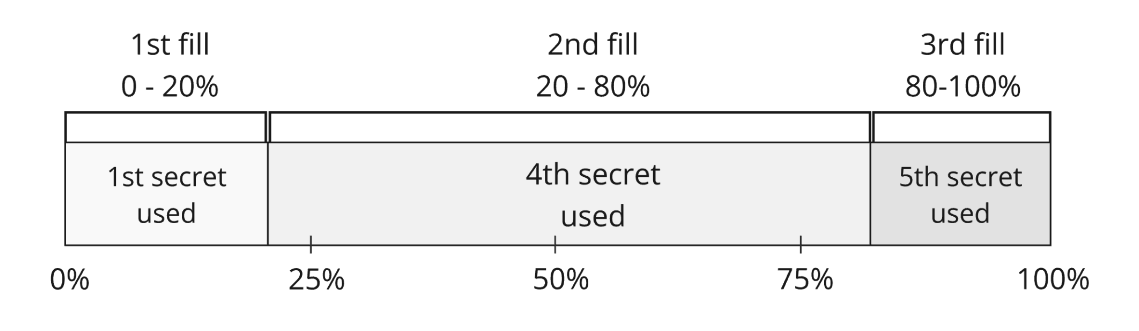
For example, if an order is divided into four parts, the first secret is used for the first 25%, the second for 50%, and so on. If a participant fills a part of the order, the next participant uses the corresponding secret based on the current progress to continue filling the order. This ensures that each participant can only fill their portion without exposing the rest of the order.
In the example image below, the 1st secret is used for the initial 0-20% fill, marking the first stage of the order. Secrets 2 and 3 are not used because the order skips directly from 20% to 80%, bypassing the ranges where these secrets would apply. The 4th secret is then used to fill the order from 20% to 80%, covering this larger portion. Finally, the 5th secret is used to complete the final 80-100% of the order, ensuring that the entire order is securely and progressively filled.
#### The partial fill feature
When an order is 100% filled, a single secret is used to finalize the transaction between two parties. However, when an order is only partially filled by different resolvers, revealing the secret to the public could let others claim the remainder of the order without completing their part.
To solve this, a Merkle tree of secrets is implemented for partial fills, which splits the order into equal parts and generates dedicated secrets for each portion of swap.
For example, if an order is divided into four parts, the first secret is used for the first 25%, the second for 50%, and so on. If a participant fills a part of the order, the next participant uses the corresponding secret based on the current progress to continue filling the order. This ensures that each participant can only fill their portion without exposing the rest of the order.
In the example image below, the 1st secret is used for the initial 0-20% fill, marking the first stage of the order. Secrets 2 and 3 are not used because the order skips directly from 20% to 80%, bypassing the ranges where these secrets would apply. The 4th secret is then used to fill the order from 20% to 80%, covering this larger portion. Finally, the 5th secret is used to complete the final 80-100% of the order, ensuring that the entire order is securely and progressively filled.
 ## API reference
For detailed information about each endpoint, refer to the Fusion+ API [OpenAPI specs](./relayer/v1.2/submit/method/post).
## API reference
For detailed information about each endpoint, refer to the Fusion+ API [OpenAPI specs](./relayer/v1.2/submit/method/post).
 ## After V 6.1
 ## API reference
For detailed information about each endpoint, refer to the classic swap API [OpenAPI specs](./methods/v6.1/1/quote/method/get).
## Quickstart
In order to quickly understand how to make an exchange using the protocol, we suggest you use the [Quickstart guide](./quick-start.md).
:::info
For workloads that require higher RPS, expanded quotas, or sustained performance, explore the available paid plans on the [**pricing page**](/pricing).
For organizations with significant trading volumes or advanced requirements, [**complete this application**](/get-enterprise) to explore tailored Enterprise options.
:::
## API reference
For detailed information about each endpoint, refer to the classic swap API [OpenAPI specs](./methods/v6.1/1/quote/method/get).
## Quickstart
In order to quickly understand how to make an exchange using the protocol, we suggest you use the [Quickstart guide](./quick-start.md).
:::info
For workloads that require higher RPS, expanded quotas, or sustained performance, explore the available paid plans on the [**pricing page**](/pricing).
For organizations with significant trading volumes or advanced requirements, [**complete this application**](/get-enterprise) to explore tailored Enterprise options.
:::



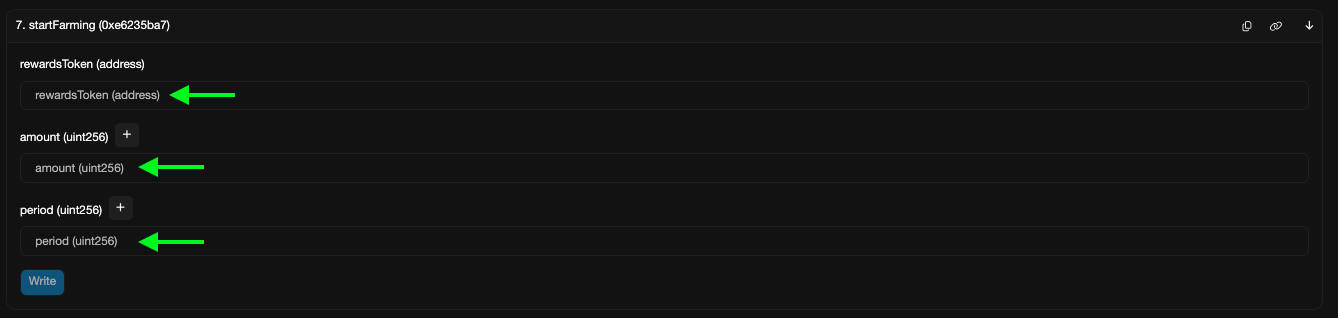
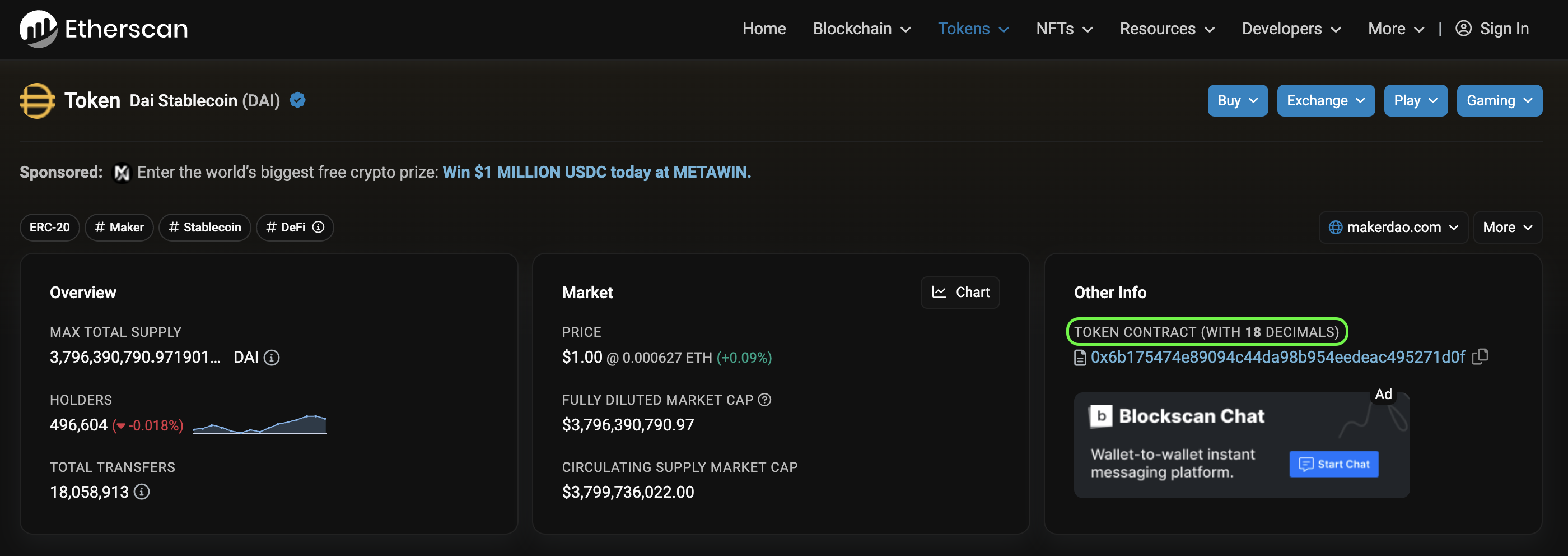 - **Src is not set:** The 'src' (source token contract) field is missing.
- **Dst is not set:** The 'dst' (destination token contract) field is missing.
- **Insufficient liquidity:** The aggregator can't find a route for the swap due to low liquidity.
## Swap-specific Errors
- **Not enough src balance:** This means your source token balance is insufficient. It provides the required amount and your current balance.
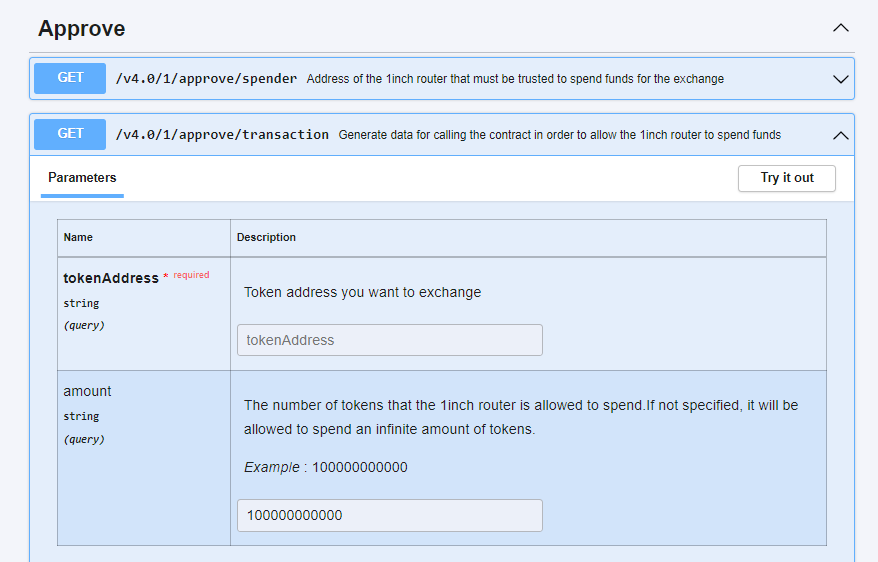
- **Not enough Allowance:** You haven't granted the necessary token allowance to the 1inch router. It'll indicate the amount, current allowance, and the spender address, e.g., "Spender: 0x1111111254eeb25477b68fb85ed929f73a960582".
- **Insufficient liquidity:** As mentioned earlier, the aggregator couldn't route the swap.
:::info
For workloads that require higher RPS, expanded quotas, or sustained performance, explore the available paid plans on the [**pricing page**](/pricing).
For organizations with significant trading volumes or advanced requirements, [**complete this application**](/get-enterprise) to explore tailored Enterprise options.
:::
- **Src is not set:** The 'src' (source token contract) field is missing.
- **Dst is not set:** The 'dst' (destination token contract) field is missing.
- **Insufficient liquidity:** The aggregator can't find a route for the swap due to low liquidity.
## Swap-specific Errors
- **Not enough src balance:** This means your source token balance is insufficient. It provides the required amount and your current balance.
- **Not enough Allowance:** You haven't granted the necessary token allowance to the 1inch router. It'll indicate the amount, current allowance, and the spender address, e.g., "Spender: 0x1111111254eeb25477b68fb85ed929f73a960582".
- **Insufficient liquidity:** As mentioned earlier, the aggregator couldn't route the swap.
:::info
For workloads that require higher RPS, expanded quotas, or sustained performance, explore the available paid plans on the [**pricing page**](/pricing).
For organizations with significant trading volumes or advanced requirements, [**complete this application**](/get-enterprise) to explore tailored Enterprise options.
:::
 ---
## What are the "parts" parameters?
The parts parameters is comprised of 3 things
- mainRouteParts
- virtualParts
- parts
Each of these has their own unique meaning. The main route parts denotes the initial split and can be seen on the UI. In this example it's the 70%/30% split
---
## What are the "parts" parameters?
The parts parameters is comprised of 3 things
- mainRouteParts
- virtualParts
- parts
Each of these has their own unique meaning. The main route parts denotes the initial split and can be seen on the UI. In this example it's the 70%/30% split
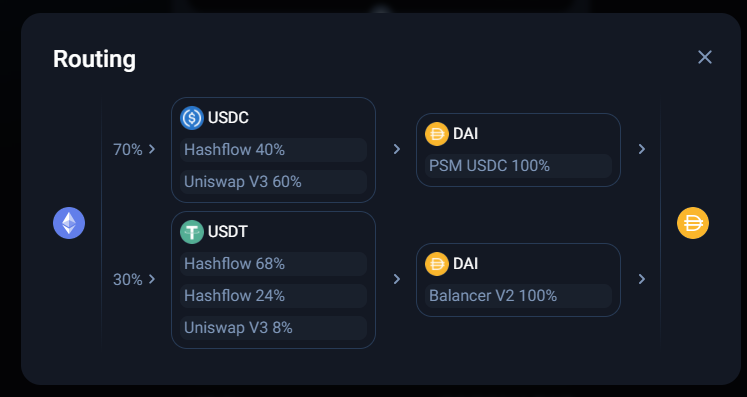 The parts parameter is how many individual blocks there can be. In the picture above we can see 4 blocks with the top being the first main route part with 2 parts to it and the bottom one being the second main route part with 2 parts in it.
The virtual parts is the splits _inside_ of a part. We can see in the first main route part above, in the first block there are 2 virtual parts splitting the USDC between hashflow and uniswap. In the second main route part we can see three virtual parts in the first block, a hashflow route with 2 different rates and one to uniswap.
## What is the "Complexity level?"
Complexity level is how many steps a swap can go through, below are the levels and what it means for the swap. Each level adds to the previous level.
- **Complexity level 0:** the source token can be wrapped or unwrapped and swapped through one liquidity pool per main route part.
- **Complexity level 1:** the source token can be wrapped or unwrapped and swapped through two liquidity pools. This means there can be up to one connector token in each main route part.
- **Complexity level 2 (Default):** the source token can be wrapped or unwrapped and swapped through three liquidity pools. This means there can be up to two connector tokens in each main route part.
- **Complexity level 3:** the source token can be wrapped or unwrapped and swapped through four liquidity pools. This means there can be up to three connector tokens in each main route part.
## How can I limit the liquidity sources in the query?
To limit the liquidity sources to a query, you can manually enter the pool-contacts that you to use using the "protocols" parameter. All other liquidity sources will be excluded by default.
### Still have questions?
Feel free to reach out to us in the live support chat!
:::tip Debugging with `X-Request-Id`
Every API response includes an `X-Request-Id` header that uniquely identifies your request. When contacting support, include this value for faster investigation. If you use the [1inch MCP Server](/portal/documentation/ai-integration/mcp-server), the `debug` tool can look up production logs by this request id.
:::
The parts parameter is how many individual blocks there can be. In the picture above we can see 4 blocks with the top being the first main route part with 2 parts to it and the bottom one being the second main route part with 2 parts in it.
The virtual parts is the splits _inside_ of a part. We can see in the first main route part above, in the first block there are 2 virtual parts splitting the USDC between hashflow and uniswap. In the second main route part we can see three virtual parts in the first block, a hashflow route with 2 different rates and one to uniswap.
## What is the "Complexity level?"
Complexity level is how many steps a swap can go through, below are the levels and what it means for the swap. Each level adds to the previous level.
- **Complexity level 0:** the source token can be wrapped or unwrapped and swapped through one liquidity pool per main route part.
- **Complexity level 1:** the source token can be wrapped or unwrapped and swapped through two liquidity pools. This means there can be up to one connector token in each main route part.
- **Complexity level 2 (Default):** the source token can be wrapped or unwrapped and swapped through three liquidity pools. This means there can be up to two connector tokens in each main route part.
- **Complexity level 3:** the source token can be wrapped or unwrapped and swapped through four liquidity pools. This means there can be up to three connector tokens in each main route part.
## How can I limit the liquidity sources in the query?
To limit the liquidity sources to a query, you can manually enter the pool-contacts that you to use using the "protocols" parameter. All other liquidity sources will be excluded by default.
### Still have questions?
Feel free to reach out to us in the live support chat!
:::tip Debugging with `X-Request-Id`
Every API response includes an `X-Request-Id` header that uniquely identifies your request. When contacting support, include this value for faster investigation. If you use the [1inch MCP Server](/portal/documentation/ai-integration/mcp-server), the `debug` tool can look up production logs by this request id.
:::